Showing posts with label GADGETS. Show all posts

Thursday, 2 March 2017

HIS HD 6870 IceQ X

HIS 6870 IceQ X Turbo X Review

Radeon HD 6870 HIS ICeQ X Turbo X
With the same high-performing cooler, the HIS 6870 IceQ X Turbo X should be remarkably similar to the HIS 6950 IceQ X Turbo X reviewed previously. The mid-range 6870 should run cool and quiet while sporting hefty overclocks like the high-end cards. Lets see if that holds true as we torture the HIS 6870 with some intense overclocking and benchmarks.

Image result for HIS HD 6870 IceQ X

Product Specifications and Features

The 6870 has been released for quite some time now, so it is not necessary to explain the the technical details and features. You can see that HIS 6870 IceQ X Turbo X sports very aggressive factory overclocks on  coming in at a blazing 975Mhz core with the memory at 1150Mhz out of the box. That is impressive from the reference clocks of 900Mhz/1050Mhz.

Technical Features

The 6870 comes with similar features as its bigger brothers do. Below is a list from the HIS website of the major features of this card.

Cooling

Image result for HIS HD 6870 IceQ X

In order to fulfill its promises of a -15° C cooler temperatures and 15db quieter operation, HIS has placed the latest IceQ cooler on the 6870. The heatsink has a nice ice blue cover helping route the airflow and give it that ‘IceQ’ look. The newest version of this cooler uses four aluminum heat pipes along with aluminum fins and a 92mm fan blowing down on to the heatsink. Air flow then exhausts partially out the back of a case, through the top and rear. Below you can see a picture of the cooling system broken down in to its parts showing how it works:

With this cooler and the automatic fan profile, the card never broke 60° C with a 23° C ambient. The fan ramped up to around the 65% mark, so it fairly quiet throughout the benchmarking and gaming sessions. Definitely audible, but quiet. When I cranked up the fan to 100% and tested that way, the card never broke 55° C even when overclocked with added voltage. Pretty impressive feat.
Overall this is one of the quietest and most effective coolers on a GPU I have seen in a while, especially when compared to the reference coolers. The auto profile in Afterburner kept the card cool and quiet throughout its active life with me which was nice to finally not have to adjust it manually.  HIS has a great cooler for the IceQ series of cards… effective, and quiet.
Image result for HIS HD 6870 IceQ X


As you can see we achieved some decent results when overclocking this card to the max. It wasn’t as big of an increase as the other cards in this series, however this card started out at 975Mhz in the first place. I was able to achieve 1021Mhz core and 1200Mhz memory to pass most tests with the voltage set on the Afterburner maximum of 1.3v. On Vantage I had to drop the core back to 1000Mhz.  I kept the fan cranked at 100% for these tests and the card peaked around 55° C. Not much of a difference vs stock speeds! I was a bit disappointed in the lack of headroom for overclocking, but after researching a bit hwbot.org, it seems as though the clocks I achieved are about normal and my expectations were just out of line. It just goes to show how aggressive the factory overclocks are on this card.
Wednesday, 22 February 2017

HERE ONE earbuds

HERE ONE earbuds

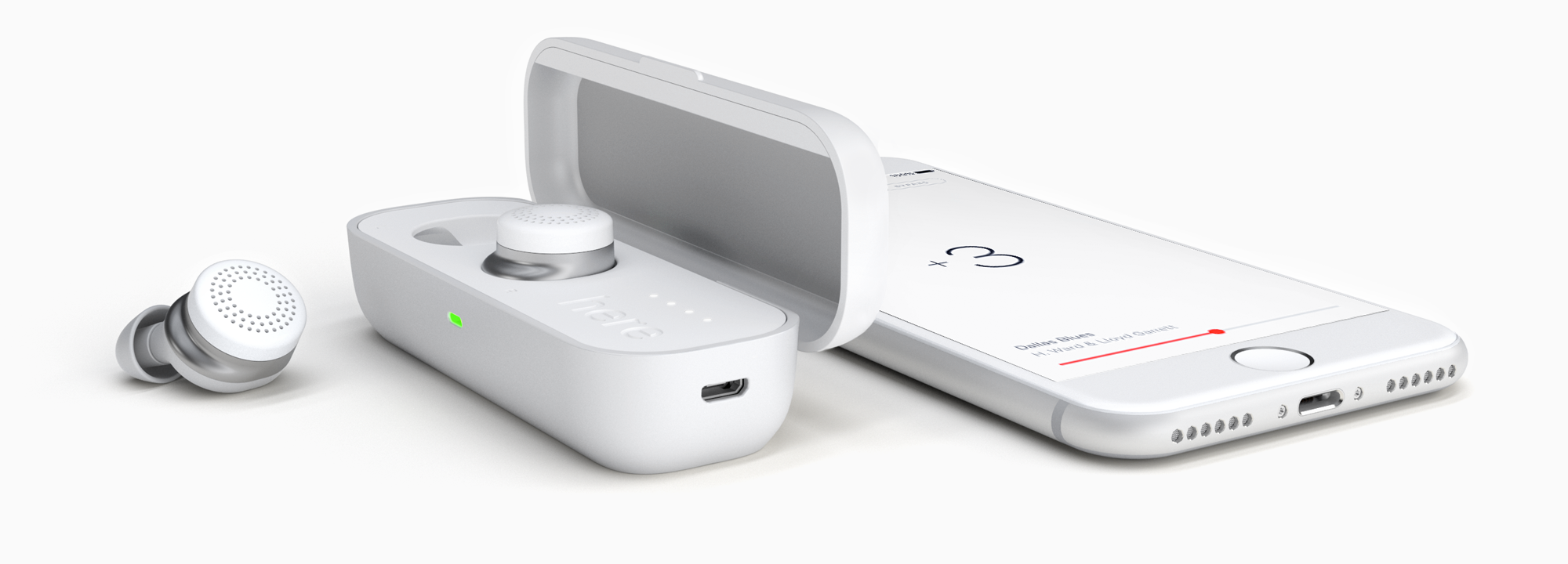
Here One earbuds and case in white

HERE ONE earbuds
Headphones are a gadget that people often fail to fully appreciate.
In the face of all the latest tech trends, headphones remain just as versatile as ever. They’re virtual reality devices letting users experience concerts in their homes, they’re the first wearables to reach ubiquity and, if you believe the folks at Doppler Labs, they’re about to find a new role in shaping consumer attitudes toward the future of augmented reality.
The $299 Here One headphones are about far more than listening to tunes, they’re about hearing different aspects of life unfold at the volume you desire. They’re also about buying into the future a tad bit earlier than everyone else and getting to experience something truly unique.
Following delays that left the device out of buyers’ hands over the holidays, Doppler Labs is finally beginning to ship out pre-orders. I’ve had a few weeks to play around with the smart earbuds, giving me time to test all their features and home in on what fits into my daily life.


Hands down, Here One sounds the best out of all the truly wireless earbuds I’ve tested. Music is more clear and dynamic than on the Bragi Headphone, which I felt was the the best-sounding pair of truly wireless earbuds until now. Here One also makes AirPods sound pedestrian, but this is also thanks to the way the earbuds create a full seal in your ear (there is a variety of rubber and foam tips included in the packaging, too). Doppler Labs is quick to boast about how many software engineers it has on staff, in part because they’re not all dedicated to the augmented reality side of things. These people know their music, and it shows.

Listening to music on Here One is like fanning out a deck of cards. You’ll discover there’s more to songs you thought you knew well. It’s not an enormous difference, like the kind you’d discover if you were listening to music through an amp or on a device with a DAC, but it’s an appreciable one.
HERE ONE earbuds


The horn parts I’m always humming along to on Dr. John’s album Locked Down haven’t changed, and yet on Here One it sounds like the instruments occupy different spaces around me, which adds to the complexity of the music. With Here One I was able to make out the wetness of Childish Gambino’s mouth (sorry) as he sings in "Zombies," a detail I had never noticed in dozens of previous listens. The earbuds also do a good job of handling high-frequency sound, too: I heard cymbal hits and high hat taps I had never noticed in the punk rock of PUP, and that music is usually muddy as hell on Bluetooth earbuds.
Something I also appreciate about Here One is that the hardware and software experience is simple and slick. With a quick tap to either earbud, for instance, you can pause that music and let in the sound around you. This is called "bypass" in the Here One app — which is fantastic, by the way — because it interrupts any music or audio filters that are working in order let in a baseline audio mix.
The bypass mode is super helpful when someone starts talking to you, but also if you just generally want to pull yourself out of your music for a moment and don’t want to pluck out (and risk dropping) the earbuds. It takes a minute to work up the muscle memory of striking the touch-sensitive part in the center of the earbuds, but once you do it becomes a simple and integral part of the experience.
The Here Ones are all about listening. You listen to them, but more impressively, they listen to everything happening around you. Each of the earbuds packs three MEMS microphones, which process the sound around the user and deliver it to their ear canals with zero latency. Using this feature (Doppler Labs calls it Active Listening), users can adjust the noises they’re hearing in the world around them, boosting voices or toning down the party.
Active Listening is broken up into a couple of flavors inside the device’s iOS app: Noise Filters, which are presets optimized for audio levels at the office or in a restaurant, and Live Mix, which lets you take control in altering the highs and lows of whatever sound environment you’re in. With either you can shift the loudness of each filter, either draining the noise 22 decibels or enhancing it by 5 decibels.
I was a frequent user of the “Office” noise filter. It drained out a lot of the light chatter around me but allowed more prominent voices to come through in full force. More often than not, however, I was just using the earbuds to keep the noise as low as possible, especially when walking around outside where the wind often heavily distorted what I was hearing with mic crackles galore.
Live Mix feels quite a bit more gimmicky when it comes to actual everyday use. While the tab was often the first one I opened when showing the Here Ones to people for the first time, there just isn’t much utility beyond the “wow” factor of your first demo with it.
4_here_one_buds_white
The biggest problem with the Here Ones is the friction required to use any of its “Active Listening” features through the iOS app. I honestly can’t think of much Doppler Labs could have done better here— the app is intuitive and well-designed— but having to use an app to trigger the noise filters is ultimately so damaging to the Here Ones’ utility. After using these headphones for a couple of weeks, the use cases of “active listening” features have become far less dynamic and I generally just toss the buds in, lower the volume to its strongest level of voice-cancelling and go to town.
For much of this millennium, we’ve had to deal with the eye sore of Bluetooth headsets with their elongated mics and chunky form factors.
While Apple got quite a bit of shit from the internet for the design of the AirPods, the wireless earbuds we are seeing emerge are by-and-large much better-looking than their ancestors. The Here Ones aren’t the tiniest wireless earbuds out there (20.1mm in height), but for their size, they are pretty stylish compared to others. Audio quality is quite good, as it admittedly should be for a $299 pair of earbuds.
Much like the AirPods, the Here Ones are a bit careful when it comes to offering a full gamut of onboard controls. Using capacitative touch, you can tap one of the headphones to go into passthrough mode, where your music is paused and you hear the world at (roughly) normal volumes. Additionally, with a double tap, you can summon Siri and dismiss her. While I can understand companies not wanting users to be stuck hitting the sides of their head to get a product functioning, I do wish Doppler had given the Here Ones a chance to be more customizable in terms of available controls.
One issue with the design is comfort. In order to cancel out a good deal of noise and allow the Here Ones to work at their best, the seal between the earbud and ear has to be pretty tight, something that was hard to get used to in terms of comfort. The Here Ones come with six sets of small, medium and large tips in both rubber and foam to help you find the best fit. Getting the right fit was a challenging task; I settled on the medium foam tips which I had to roll up a bit before placing in my ears and allowing them to expand.
Ultimately, the uncomfortable fit needed to make the most of the Here Ones is probably what left me reaching for my AirPods in most situations.
The other thing that left me reaching for my AirPods was the fact that my Here Ones were often dead. Battery life is probably the most notable disappointment of the Here Ones. They didn’t scrape past two hours for combined music/ active listening usage. This was a real bummer, and although the case adds another three full charges, it was annoying that I needed to take an hour-long charging break when I was rocking these during a flight, which is a pretty prime use case for these.
There’s a lot more happening here than on the average pair of headphones so the battery taking a hit is understandable but Doppler Labs initially was promising battery life of about double what it ended up shipping with.


The wearable market has been embodied by products like smart watches that offer limited functionality improvements to the smartphones they are connected to, but are ultimately not giving users a markedly evolved user experience. With the Here Ones, the world of Black Mirror and Her seems closer than ever.
I’ve always been particularly excited by the future that smart wireless earbuds offer. Having a device in your ear that can effortlessly take voice input and give auditory feedback is truly going to shift how people engage with computers and the world. Augmented reality doesn’t need a visual headset like HoloLens to revolutionize interactions, earbuds and audio interfaces could very well be the place we see the next bouts of consumer attention, especially as digital assistants like Siri and Alexa see their skills improve.
Regardless of what the company claims, the Here One is a device with an always-on future embedded in its philosophy. The device’s short battery life curtails these early dreams, but the ideas surrounding active listening and some of the more experimental efforts the company is currently engaged with paint the picture of a future where we can hear the future we want to. Though most wireless earbuds currently mimic the headphones we’ve had for decades, I would be surprised not to see the technology Doppler Labs has built for the Here Ones to be found in the next generation of wireless ‘buds.
These headphones are a taste of a near-term future that is full of exciting possibility. Augmented reality isn’t just about Magic Leap, it’s about being able to customize what the future sounds like to you.

Friday, 17 February 2017

Google Home

Google Home

Image result for Google Home Review
Google Home is a voice-activated speaker powered by the Google Assistant. Google Home is the Echo competitor that puts the search giant’s much-touted new Google Assistant intelligence technology inside a small, but powerful Echo-like speaker and microphone.
Both wildly intelligent and supremely versatile in the ways in which it can be used, Google Home is farther along in its first week than Amazon Echo was in its first six months. It still has a ways to go to catch up – starting, perhaps, with better integration with Google’s own services – but it has real potential to one day be the smart home command center Google wants it to be.

HIGHS

  • It can be personalized to you, giving you info on your commute, weather, and calendar
  • Works with Chromecast
  • Answers questions and follow-ups fairly well
  • Lots of choices for music

LOWS


  • Can only link to one Google account for now
  • Limited smart home control


  • Design and features

    The Home reminds me a little of a nesting doll that’s had its top shorn off at an angle. It’s white and comes with a gray base, but for another $20 you can get orange, purple, or teal fabric, and $40 will get you a metal version in black, white, or copper. (They actually have fancier names, but I’m not going to call something mango and expect you to know what I’m talking about.)
    The angled top is touch-sensitive and illuminates with multi-colored dots when you summon the device with an “OK, Google” or “Hey, Google,” the phrases that signal it should start listening. You can use the surface to change the volume, start a request, play or pause music, or turn off an alarm or timer. There’s a microphone button in the back, so you can ensure the device isn’t listening.

    Inside are two far-field microphones, five fewer than the Echo’s seven. I was fine calling out commands in my 850-square-foot condo, but that’s because the Home was centrally located. If you have more than one, only the nearest one should respond, so you don’t have a chorus of Homes answering your requests.
    Getting Google Home up and running takes just minutes. I downloaded the iOS Google Home app, added the device, and was walked through a few basics on my phone. Then it was ready to start doing my bidding.
    Image result for Google Home Review

    In control

    Alexa launched with limited ability to control smart-home devices, and Google Home works with a similar small number at the moment: Philips Hue bulbs, SmartThings devices, Nest, and If This Then That recipes. What it does, it does well, though. While I need a complicated recipe from a third-party app to turn my Hue bulbs purple with Alexa, Google Home does it all on its own.

    Friday, 27 January 2017

    Building a Computer? Here's What You Need.

    Customizing a Computer? Here's What You Need

    Image result for build a computer

    There are plenty of reasons to build a custom computer. While custom computers may initially be more expensive than prepackaged desktops or laptops, they can provide you with nearly endless possibilities, whether you're looking for a top-notch gaming machine, a system for mixing music, or the ideal choice for developing Web applications.
    A custom computer is the way to go if you want both performance and flexibility. Upgrading individual parts often is less expensive than buying a new computer, which could save you money in the long run.
    Following are the essential parts you'll need.

    Processor and Motherboard

    The component to start with is the processor, which will dictate your selection of other necessary parts, like the motherboard. UserBenchmark's exhaustive list of user-rated processors is a good resource to help you decide. AMD and Intel are the top manufacturers, but I prefer Intel.
    Intel is the industry standard when it comes to processors, so you can't go wrong if that's your choice. Its Core series comes in three families: i3, i5 and i7. The i3 series is good for average computing needs, while the i5 offers a little more horsepower. The i7 series offers you the best performance. For the price, a Core i7-6700k really can't be beat.
    After you choose your processor, select a motherboard to go with it. Make sure it is USB 3.1/3.0-capable for optimal speed. One factor to consider is whether you plan on overclocking, which involves running your PC at a speed higher than manufacturer recommendations.
    computer motherboard
    While you can benefit from short-term performance boosts, overclocking may lead to a shorter lifespan for your computer, so you'll need to consider a compatible motherboard if you plan to do it.

    Storage and Memory

    Next, choose the storage you want to use. HDD drives are the traditional hard drives that most computers have, and they are extremely affordable.
    computer hard disc
    However, SSDs are the choice for sheer performance, and their prices are dropping.
    I prefer a hybrid option that includes both. A computer built with its system files on a smaller SSD will boot faster, while a larger and cheaper HDD in the 2-TB range gives plenty of storage.

    Decide how much RAM you need. If you plan on running a 32-bit OS, then you only need 3 GB of memory since the OS won't support any more. Most likely, though, you will be using a 64-bit architecture where 4 GB is the minimum.
    RAM is a relatively cheap upgrade for the performance you get in return. Choose 8, 12, or 16 GB for a better user experience.
    You can also put in a DVD/CD drive, though it is not necessary, thanks to portable storage and cloud-based software.

    Video and Audio Cards

    If you intend to play video games, create digital graphics or edit video, you should invest in something more advanced than a basic video card.
    For enhanced graphics, AMD, ATI or Nvidia cards will do the trick. The AMD Radeon RX 460 is a reasonably affordable option that can also handle the needs of most casual gamers.
    The same goes for your audio card: If you are editing audio files, you should always opt for a higher-quality card that's compatible with the peripheral equipment you want to connect.

    Case, Power and Cooling

    You have to buy a case to hold all of that amazing hardware! There are many types of cases on the market with different features. Many cases have a rudimentary power supply and cooling fans. However, if you are building a high-performance system, they are probably inadequate.
    All that performance generates heat. Too much heat will cause your computer to crash and may even damage hardware, so be sure to invest in some qualitycomputer cooling fans.
    At a minimum, you will want one attached to your CPU heatsink, one larger fan to exhaust heat from the case -- and if not built in, one to disperse heat from your graphics card.
    The more powerful your components, the more power you'll need to run your system properly. You don't want to burn through a cheap power supply and have everything shut down on you.
    Plan on at least a 500w power supply, but if you've opted for a bigger processor, graphics card, and the requisite fans, you'll need something with more juice. Your components may come with recommended power allowances. If not, I suggest at least a 750w power supply.
    Final Thought: Don't be afraid to invest more money up front, as your custom machine can provide years of use before you'll need to upgrade it again. Good luck with your project -- and most of all, have fun!

    Monday, 10 October 2016

    IP Rating Explained

    IP Rated Enclosures Explained

    What is an IP rating?

    Image result for ip rating
    IP (or "Ingress Protection") ratings are defined in international standard EN 60529 (British BS EN 60529:1992, European IEC 60509:1989). They are used to define levels of sealing effectiveness of electrical enclosures against intrusion from foreign bodies (tools, dirt etc) and moisture.

    What do the numbers in an IP Rating mean?

    The numbers that follow IP each have a specific meaning. The first indicates the degree of protection (of people) from moving parts, as well as the protection of enclosed equipment from foreign bodies. The second defines the protection level that the enclosure enjoys from various forms of moisture (drips, sprays, submersion etc). The tables below should help make sense of it:

    IP Ratings - what they mean.

    IP Rated Enclosures - quick find chart

    A number replaced by x indicates that the enclosure is not rated for that spec.

    First Digit (intrusion protection)

    1. No special protection<
    2. Protection from a large part of the body such as a hand (but no protection from deliberate access); from solid objects greater than 50mm in diameter.
    3. Protection against fingers or other object not greater than 80mm in length and 12mm in diameter.
    4. Protection from entry by tools, wires etc, with a diameter of 2.5 mm or more.
    5. Protection against solid bodies larger than 1mm (eg fine tools/small etc).
    6. Protected against dust that may harm equipment.
    7. Totally dust tight.

    Second Digit (moisture protection)

    1. No protection.
    2. Protection against condensation
    3. Protection against water droplets deflected up to 15° from vertical
    4. Protected against spray up to 60° from vertical.
    5. Protected against water spray from all directions.
    6. Protection against low pressure water jets (all directions)
    7. Protection against string water jets and waves.
    8. Protected against temporary immersion.
    9. Protected against prolonged effects of immersion under pressure.
    • IP65 Enclosure - IP rated as "dust tight" and protected against water projected from a nozzle.
    • IP66 Enclosure - IP rated as "dust tight" and protected against heavy seas or powerful jets of water.
    • IP 67 Enclosures - IP rated as "dust tight" and protected against immersion.
    • IP 68 Enclosures - IP rated as "dust tight" and protected against complete, continuous submersion in water.


    Before you leave, do me a favor and answer me this question:
    What’s your opinion of Bitcoin
    ~Is it here to stay — permanently — or is it just another passing fad?

    Leave your comment below  (Please! Don’t forget to use the social sharing buttons, either)!

    Sunday, 9 October 2016

    Leica’s X-U Review

    Leica’s first underwater rugged camera

    Leica_waterproof (2)
     X-U  camera this amazing shooter has amazed us aplenty with a promise of being rustproof, shockproof when dropped from four feet and of course, the 49-feet waterproof ability. 
    The camera has a 3-inch 920k-dot LCD display that you can review and preview your shots on. You will enjoy shots captured at 5 fps thanks to a maximum ISO of 12,500 and 1080p HD footage at 30 fps.
    Leica_waterproof (5)
    You will find the manual shutter speed and aperture control dials atop the camera and placed above the lens is an integrated flash. 
    The camera sports a 16.2-megapixel APS-C CMOS sensor with the hallmark Summilux 23 mm f/1.7 lens In the front of the camera.
    The rubberized exterior does well to absorb shocks and also serves as a fantastic grip.
    Leica_waterproof (1)
    Not only that is a great to use camera but also a handsome camera to have one.


    Before you leave, do me a favor and answer me this question:
    What’s your opinion of Bitcoin
    ~Is it here to stay — permanently — or is it just another passing fad?

    Leave your comment below  (Please! Don’t forget to use the social sharing buttons, either)!

    Monday, 26 September 2016

    iOS 10 REVIEW

    iOS 10 review


    Image result for ios 10

     iOS 10, the latest operating system for Apple's iPhone and iPad. On June 13, 2016, Apple unveiled iOS 10, the next-generation operating system for the iPhone, iPad, and iPod touch,  on September 13 it was released to the public. At the introduction, Apple CEO Tim Cook described iOS 10 as the "biggest release ever" for iOS users, and the operating system includes major updates for a wide variety of apps, features, and services, including Messages, Maps, Apple Music, News, Apple Pay, Siri, Photos,  Control Center, and more.
    Image result for ios 10  Features:
    *Siri
    Siri now integrates third-party apps Apple is opening up Siri and making the process for app developers transparent is great which is important, some apps can now be controlled by Siri: calls, messaging, payments, photos, ride-sharing apps, workouts, and CarPlay systems. Square Cash,  WhatsApp, and Yelp, LinkedIn, OpenTable, Uber, are all options inside Siri.
    In settings you can find a list of your apps that support Siri.
    You still can only use Siri with voice and can’t type at it.
    *Maps:
    Apple Maps has been overhauled in iOS 10. Apple has put a slider on top of the map canvas, on the bottom, and generally cleaned up the way it displays pins and locations on the map itself.
    The CarPlay navigation view is a little more robust now, too. It can connect to restaurant apps and ride-sharing apps and the navigation view is also better and allows you to search along the route.
    *iMessage:
    iMessage is becoming a platform all its own. There are third-party apps, stickers, crazy confetti effects, and emoji.  You can embiggen your texts so they slam on the screen when you send them. You can turn your phone sideways and scribble out notes — then send them with the "invisible ink" option so your recipient has to manually reveal them. You can search for GIFs . You can draw on photos before you send them.
    The basics are easy, and if you want to go bonkers you can hunt the rest down. our chats could become a multimedia nightmare of stickers, drawings, audio clips, GIFs, heart beats, kisses, and laser effects. Or maybe that's a wonderland, not a nightmare. Your call.
    There are also more full-featured apps in iMessage.
    *Lock screen and notifications:
     Apple Slide to Unlock feature that was one of the defining features of iPhones since they were first announced is out of the way now. Instead, you'll use Touch ID and press the home button to unlock. It's different, and it takes a little getting used to.
    The screen wakes up as soon as you lift your phone up, showing your notifications straight away. To unlock, you press the home button.
    The bigger change to the lock screen is how it handles notifications: they've been overhauled all over the OS, and the lock screen gets those benefits. They look different now they're discrete bubbles.
    *Widgets:
    Today View shows up in three places: the left of the home screen, notification pane, and lock screen. It's a place for you to put all your widgets for weather and news and whatever else, replacing Apple's own half-baked attempts with the old Siri predictive screen. Apple’s own apps have a bunch of widgets ready for use and there are third-party widgets already available, too because they were there on iOS 9. But they’re easier to find now.And Control Center also lets you use 3D Touch on the bottom row of icons (which, frustratingly, you cannot change) but not (again, frustratingly) the system toggles on the top. It’s split into two, sometimes three panes. The first is for system controls, the second for audio controls, and the third (if you need it) for smart home controls.
    *Music
    Image result for ios 10 Music

    Apple Music in iOS 10, is the better. The "Connect" tab, a little feed of content from your favorite artists, has been sent off to live with Ping on the island of forgotten Apple social ideas.
    The overall navigation and organization of the app has been clarified and cleaned up. Like Spotify, Apple Music is trying to be at least two things at once: a place to navigate your own music library and a place to discover new music via a subscription service.
    The new "Now Playing" screen is also simplified, just don't forget to scroll up a bit to get options like lyrics and the shuffle / repeat buttons.
    *Other Apps:

    Apple News continues to exist, now with breaking news notifications from key partners
    Apple Mail. It finally does a decent job threading emails into a single, scrollable pane of messages. you couldn't imagine using a mail client that doesn't offer a "snooze" function anymore, and there are too many good options out there that offer it to consider sticking with Apple Mail.
    *CarPlay:
    Image result for CarPlay in iOS 10
    Just like in iOS 10 for iPhone, iPad and iPod touch devices, Apple CarPlay now has the ability to remove or hide stock apps if the user sees fit. It’s natural to assume that not every stock app that ships pre-installed with CarPlay will be useful to the vehicle owner, just like not every app on the iPhone or iPad is utilized frequently. Seeing this, Apple has given users the ability to remove stock apps in CarPlay as well.
    This option can be accessed by heading into Settings > General > CarPlay > [Your Car/Receiver Name] on the connected iPhone.

    Before you leave, do me a favor and answer me this question:
    What’s your opinion of Bitcoin
    ~Is it here to stay — permanently — or is it just another passing fad?
    Leave your comment below  (Please! Don’t forget to use the social sharing buttons, either)!