Showing posts with label IPHONE. Show all posts

Monday, 26 September 2016

iOS 10 REVIEW

iOS 10 review


Image result for ios 10

 iOS 10, the latest operating system for Apple's iPhone and iPad. On June 13, 2016, Apple unveiled iOS 10, the next-generation operating system for the iPhone, iPad, and iPod touch,  on September 13 it was released to the public. At the introduction, Apple CEO Tim Cook described iOS 10 as the "biggest release ever" for iOS users, and the operating system includes major updates for a wide variety of apps, features, and services, including Messages, Maps, Apple Music, News, Apple Pay, Siri, Photos,  Control Center, and more.
Image result for ios 10  Features:
*Siri
Siri now integrates third-party apps Apple is opening up Siri and making the process for app developers transparent is great which is important, some apps can now be controlled by Siri: calls, messaging, payments, photos, ride-sharing apps, workouts, and CarPlay systems. Square Cash,  WhatsApp, and Yelp, LinkedIn, OpenTable, Uber, are all options inside Siri.
In settings you can find a list of your apps that support Siri.
You still can only use Siri with voice and can’t type at it.
*Maps:
Apple Maps has been overhauled in iOS 10. Apple has put a slider on top of the map canvas, on the bottom, and generally cleaned up the way it displays pins and locations on the map itself.
The CarPlay navigation view is a little more robust now, too. It can connect to restaurant apps and ride-sharing apps and the navigation view is also better and allows you to search along the route.
*iMessage:
iMessage is becoming a platform all its own. There are third-party apps, stickers, crazy confetti effects, and emoji.  You can embiggen your texts so they slam on the screen when you send them. You can turn your phone sideways and scribble out notes — then send them with the "invisible ink" option so your recipient has to manually reveal them. You can search for GIFs . You can draw on photos before you send them.
The basics are easy, and if you want to go bonkers you can hunt the rest down. our chats could become a multimedia nightmare of stickers, drawings, audio clips, GIFs, heart beats, kisses, and laser effects. Or maybe that's a wonderland, not a nightmare. Your call.
There are also more full-featured apps in iMessage.
*Lock screen and notifications:
 Apple Slide to Unlock feature that was one of the defining features of iPhones since they were first announced is out of the way now. Instead, you'll use Touch ID and press the home button to unlock. It's different, and it takes a little getting used to.
The screen wakes up as soon as you lift your phone up, showing your notifications straight away. To unlock, you press the home button.
The bigger change to the lock screen is how it handles notifications: they've been overhauled all over the OS, and the lock screen gets those benefits. They look different now they're discrete bubbles.
*Widgets:
Today View shows up in three places: the left of the home screen, notification pane, and lock screen. It's a place for you to put all your widgets for weather and news and whatever else, replacing Apple's own half-baked attempts with the old Siri predictive screen. Apple’s own apps have a bunch of widgets ready for use and there are third-party widgets already available, too because they were there on iOS 9. But they’re easier to find now.And Control Center also lets you use 3D Touch on the bottom row of icons (which, frustratingly, you cannot change) but not (again, frustratingly) the system toggles on the top. It’s split into two, sometimes three panes. The first is for system controls, the second for audio controls, and the third (if you need it) for smart home controls.
*Music
Image result for ios 10 Music

Apple Music in iOS 10, is the better. The "Connect" tab, a little feed of content from your favorite artists, has been sent off to live with Ping on the island of forgotten Apple social ideas.
The overall navigation and organization of the app has been clarified and cleaned up. Like Spotify, Apple Music is trying to be at least two things at once: a place to navigate your own music library and a place to discover new music via a subscription service.
The new "Now Playing" screen is also simplified, just don't forget to scroll up a bit to get options like lyrics and the shuffle / repeat buttons.
*Other Apps:

Apple News continues to exist, now with breaking news notifications from key partners
Apple Mail. It finally does a decent job threading emails into a single, scrollable pane of messages. you couldn't imagine using a mail client that doesn't offer a "snooze" function anymore, and there are too many good options out there that offer it to consider sticking with Apple Mail.
*CarPlay:
Image result for CarPlay in iOS 10
Just like in iOS 10 for iPhone, iPad and iPod touch devices, Apple CarPlay now has the ability to remove or hide stock apps if the user sees fit. It’s natural to assume that not every stock app that ships pre-installed with CarPlay will be useful to the vehicle owner, just like not every app on the iPhone or iPad is utilized frequently. Seeing this, Apple has given users the ability to remove stock apps in CarPlay as well.
This option can be accessed by heading into Settings > General > CarPlay > [Your Car/Receiver Name] on the connected iPhone.

Before you leave, do me a favor and answer me this question:
What’s your opinion of Bitcoin
~Is it here to stay — permanently — or is it just another passing fad?
Leave your comment below  (Please! Don’t forget to use the social sharing buttons, either)!
Friday, 23 September 2016

ZUBIE PLUS IN-CAR WIFI

ZUBIE GPS PLUS IN-CAR WIFI

Image result for ZUBIE GPS PLUS IN-CAR WIFI
Everyone are looking for modern ways to track their vehicles. The new Zubie device with 
Best all-around mobile application, Strong Wi-Fi connection through Verizon, Business features and plan available aims to meet the needs of both applications with a device to send your vehicle’s information from the ODBII port right to your smartphone or computer. 

The Zubie can send you an automated update on your car's location and keep track of maintenance.
 Zubie was created with partial funding from Best Buy back in 2012. 
The device has been one of the earlier pioneers in the connected car industry and have expanded to the newest Wi-Fi model. The Zubie basic unit without Wi-Fi is technically free but you will pay $100 which includes the first year of service and service going forward will continue at $100/year.
The  Wi-Fi model Service cost will you a bit more at $10 per month or $120 per year.
In either case there are no contracts, a 30 day money back guarantee, and one year warranty. 

Because of the partnership with Verizon, the Zubie Wi-Fi can act as a hotspot but you will  need to connect it to the Verizon network with an existing plan or start a new Verizon plan.  The partnership made Zubie to have a more consistent Wi-Fi connection and higher speeds than any order the competing devices using T-Mobile or Sprint.

Driving connected, Once the zubie is received you can  sync your Zubie with an account on zubie site,

 or within the Zubie mobile application for iOS and Android

Image result for ZUBIE GPS PLUS IN-CAR WIFIImage result for ZUBIE GPS PLUS IN-CAR WIFI

The Zubie application will give the location of vehicles within the group  making important information readily available. 

Once  a vehicle card on the main screen is selected  the current fuel level, self test results, battery status, and any maintenance alerts. Scrolling down further, will sow a map and information such as distance, time length, driving habits, and fuel cost of your latest trip.


Image result for ZUBIE GPS PLUS IN-CAR WIFI


Before you leave, do me a favor and answer me this question:
What’s your opinion of Bitcoin
~Is it here to stay — permanently — or is it just another passing fad?
Leave your comment below  (Please! Don’t forget to use the social sharing buttons, either)!

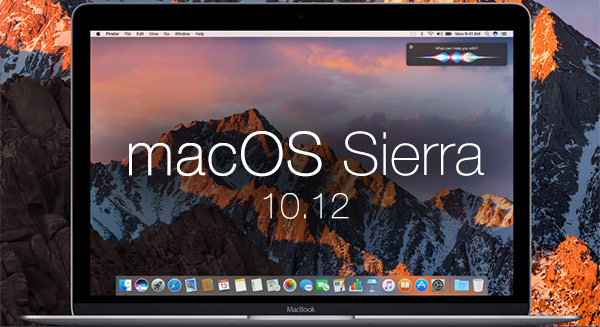
WILL MY MAC RUN MAC SIERRA

WILL MY MACBOOK  RUN MAC SIERRA

Image result for macOS Sierra
On September 20 macOS Sierra the latest version of the Mac operating system was made available for free in the App Store.
But the the big question: Is your Mac compatible with Sierra? lets see the compatibility list, according to Apple.
Image result for macOS Sierra

OS requirements
You can upgrade from OS X 10.7 Lion or later.
Apple Pay and Universal Clipboard Requirements
To use your iOS device with Universal Clipboard, that device needs to run iOS 10.
For Apple Pay, you also need:
*iOS device running iOS 10 
or
*Apple Watch running watchOS 3
To use the Apple Pay and Universal Clipboard you'll need the following:
iMac (Late 2012 and later)
MacBook Air (Mid 2012 and later)
MacBook Pro (Mid 2012 and later)
Mac mini (Late 2012 and later)
Mac Pro (Late 2013)
MacBook (Early 2015 and later)
Auto Unlock Requirements
You need these to use Sierra’s Auto Unlock feature.
Any Mac model from 2013 or later
Signed in to iCloud with the same Apple ID
Two-factor authentication must be turned on
iPhone running iOS 10
Apple Watch running watchOS 3
MacOS Sierra compatible
iMac (Late 2009 and later)Mac mini (2010 and later)Mac Pro (2010 and later)MacBook (Late 2009 and later)MacBook Air (2010 and later)MacBook Pro (2010 and later)

Before you leave, do me a favor and answer me this question:
What’s your opinion of Bitcoin
~Is it here to stay — permanently — or is it just another passing fad?
Leave your comment below  (Please! Don’t forget to use the social sharing buttons, either)!
Friday, 16 September 2016

Trackr

How to track your all gadget using your smartphone.


New tracking method adapted to all budgets.
Lost your car and can’t remember where you parked? It happens to the best of us: wandering aimlessly through parking lots, clicking the panic button on your key chain to get your headlights to illuminate.
You don’t need some spendy radio transponder to keep tabs on your car. Uplinking your wheels to the great eye in the sky without breaking the bank is easier than you think.
Standalone GPS and radio triangulation units can cost hundreds. And that’s not counting the installation and (frequently hefty) activation and monthly fees associated with whatever service you do choose. For most of us, it’s overkill.
The good news is that some of life’s biggest problems seem to be disappearing because of new technology.. If you frequently forget where you parked your car, there is a tiny gadget and app that could be what you’re looking for.
What is it about?
It’s about Trackr, A small and discreet device the size of a coin that is revolutionizing the market..
trackr-bravo-4
But… How does it work?
Very easy! It will take less than five minutes to put it to work. You simply have to pair it with your smartphone and download the free application which will allow you to locate it anytime.
Once this is done, you simply have to put it on your key chain, in your wallet or in any object you want to locate always. In this case you just have to hide it in your car.
Now just have to open the application on your mobile and you can see on the map the position of your device. If you get to lose your car, simply select “find device”and you’ll get the coordinates of the new location.


With Trackr you’ll be able to locate your car at any time

In the following video you’ll be able to see it in action:
How much is it going to cost?
You’re probably thinking that this device will be very expensive…. nope. This is the best part, you can acquire one for so little, the price is about 27$. Not bad considering it gives peace of mind.

How to buy it?
That’s easy, you can buy it from the website.
Update
Now you can buy 2 units and get 1 free Offer ends on Friday, 13 August 2016

Other functions
Do you often forget your wallet? Forget where you left your keys? Or want to prevent your pet from escaping? With Trackr you can also track your personal belongings, just simply attach it to anything you consider important for you or easy to lose, you link it to your Smartphone (with the Trackr application) and you will find what you lost, it’s that easy!

Detailed instructions on how to use Trackr
Now that you are aware of the potential of this curious device, we will make a brief summary to clear all your doubts:
  • Step 1: Get Trackr Bravo from this website,, you’ll get it delivered to your home in about 1 week.
  • Step 2: Link Trackr Bravo with your Smartphone (iPhone or Android) and hide it in your car.
  • Step 3: Download the app and always have in hand the location of your valuables.
As Simple As That Comment!

Before you leave, do me a favor and answer me this question:
What’s your opinion of Bitcoin
~Is it here to stay — permanently — or is it just another passing fad?
Leave your comment below  (Please! Don’t forget to use the social sharing buttons, either)!


Installing Wine on Mac OS X

 How To Install Wine On Mac


Image result for how to install wine on mac    Wine is an awesome  free, legal, and open source software  that lets you run Windows apps without the Windows operating system. 
To install Wine on your Mac, you will need the following:
  • OS X 10.9 (Mavericks) or above
  • Access to an Admin account, with password
  • An internet connection
  • some time 

Image result for how to install wine on mac

Install Xcode
Xcode is an app that is used to compile source code made by Apple.
It's available on the Mac App Store. Use the Mac App Store to install Xcode, and then run it and open the Preferences. Go to the Downloads tab, and if the "Command Line Tools" are available, install them. (If not, that means is already installed.)
Install Homebrew
Image result for how to install wine on macHomebrew is a package manager that makes installing open source programs easier. Homebrew itself is simple to install: just open up the Terminal and run this command:
ruby -e "$(curl -fsSL https://raw.githubusercontent.com/Homebrew/install/master/install)"

Press Enter when asked to proceed . Type in the password to the Admin account on your computer if asked and press Enter. If the installation was successful, and terminal ask you to run brew doctor. Do so by running this command:
brew doctor
you'll see the message Your system is ready to brew, When everything is setup correctly,
Note: If Homebrew tells you that you need to agree to the Xcode license, do that by running:
sudo xcodebuild -license
The Xcode license will fill up Terminal window read it, type agree and hit enter to agree to the license.
Install Homebrew Cask
Homebrew Cask is a homebrew extension that it uses to install other programs. Install the Cask by running:
brew tap caskroom/cask
Install Required Casks

Java and XQuartz are what wine needs to run correctly, install them with Homebrew Cask. Run the this command:

brew cask install java xquartz
Install Wine with Homebrew
Now we'll install the actually install Wine! Homebrew will do all the work for us, just type this command:
brew install wine
This step will probably take awhile 
If you get an error message at this step that reads error: C compiler cannot create executables orFailed to locate 'make' in path, it means you forgot to install Xcode, or it installed incorrectly. 
Enjoy and don't forget to comment!!!
Before you leave, do me a favor and answer me this question:
What’s your opinion of Bitcoin
~Is it here to stay — permanently — or is it just another passing fad?
Leave your comment below  (Please! Don’t forget to use the social sharing buttons, either)!

Thursday, 8 September 2016

Apple iPhone 7 Full specs, key features, UK price and release date

Apple  iPhone 7 and 7 Plus without headphone jack unveiled


The new iPhone 7 and 7 Plus was announced in San Francisco on Wednesday by Apple .

The new iPhones resemble the iPhone 6S and 6S Plus a little  and do not have a 3.5mm headphone jack (a first on any iPhone).

Design
The antenna lines was done away with the new Jet Black model that has a brand new glossy enclosure.
12MP camera
4.7" Retinal HD display with wide color gamut
Optical image stabilization
7MP FaceTime HD camera
New Touch Home button 
Water and dust resistant
Stereo speakers
A10 Fusion chip
LTE Advanced up to 450 Mbps
Longest battery life ever in an iphone
iOS 10.
There's  a new regular Black model along with the typical rose gold, silver and gold colors. They are all made of aluminum.
The home button is touch-sensitive and builds on the Force Touch trackpads Apple includes on its new MacBooks, that means  it's not a physical button that can be pressed, but one that simulates a button press.

Screen size 
The iPhone 7 comes with a 4.7-inch Retina HD IPS display with 1,134 x 750 resolution at 326 ppi (pixels per inch). The larger iPhone 7 Plus comes with a 5.5-inch Retina HD IPS screen with 1,920 x 1,080 resolution at 401 ppi. 
The screens are also 25 percent brighter and deliver a wider range of colors and increased contrast. 
Improved cameras

Apple bumped iSight camera's resolution from 8 megapixels to 12 megapixels last year on the iPhone 6S and 6S Plus. 

For the new iPhones, the resolution remains the same at 12 megapixels, but the iPhone 7 finally gets optical image stabilization (a first on the smaller model) and the larger iPhone 7 Plus has two 12-megapixel cameras; one has a wide-angle lens and the other is a telephoto lens.
With the two cameras, the iPhone 7 Plus can zoom up to 2x via optical zoom between the two lenses and up to 10x via digital zoom.
The new camera is comprised of a new 6-element lens with larger f/1.8 aperture which helps take even better photos in low-light situations, putting it on par with some of the best Android phone cameras.

There's a new quad-LED flash that outputs 50 percent more flash than previous iPhones 
The cameras are also a lot faster to autofocus and shoot. On the larger iPhone 7 Plus, the camera is capable of capturing photos with bokeh (blurred out backgrounds) with shallower depth of field.
The front-facing FaceTime camera is now 7-megapixels (up from 5-megapixels).
Water and dust-resistant
The new iPhones are IP67 water and dust-resistant. That's good enough to be submerged in up to 3.2 feet of water for up to 30 minutes.
Stereo speakers
For the first time the iPhone has stereo speakers, which can output 50 percent louder sound. One speaker is in the earpiece and the other on the bottom.
Headphone jack is gone

Yep, the headphone jack is gone. Deader than dead.
iPhone 7 and 7 Plus users will need to use Lightning-based headphones, which will be included in the box.


Every new iPhone will also include a Lightning-to-3.5mm headphone jack dongle in the box that work with existing headphones.
Not into any of those two options? Apple's got new wireless AirPods, its new wireless earbuds that are basically EarPods sans wires.
Pricing and availability
The iPhone 7 will come in three storage models: 32GB ($649), 128GB ($749) and 256GB ($849). The iPhone 7 Plus also comes in the same storage models: 32GB ($769), 128GB ($869) and 256GB ($969).
Pre-orders start on Sept. 9 and devices ship on Sept. 16.
Installment plans will also be available:


iOS 10 and watchOS 3 will be available on Sept. 13.


Before you leave, do me a favor and answer me this question:
What’s your opinion of Bitcoin
~Is it here to stay — permanently — or is it just another passing fad?
Leave your comment below  (Please! Don’t forget to use the social sharing buttons, either)!