Friday, 17 February 2017

Ledger Nano S

Ledger Nano S: secure multi-currency hardware wallet

Ledger Nano S is a secure Bitcoin and Ethereum hardware wallet. It connects to any computer through USB and embeds a built-in OLED display to double-check and confirm each transaction with a single tap on its side buttons.


It is available for the price of 58 EUR (+VAT) and is fully compatible with the previous generation of Ledger products if you want to import an existing account.

Main features

  • Cryptographic secrets protected by a secure chip
  • Bitcoin and Ethereum support (Open Source apps)
  • Confirmation of transactions on the embedded screen
  • Built-in 4 digit PIN security lock
  • Built-in onboarding (seed generation and recovery)
  • BIP39 seed (12/18/24 words), easy backup and restoration
  • Multi-apps support: FIDO U2F, GPG, SSH…
  • USB connectivity
  • Foldable and compact casing
  • Compatible with Ledger Wallet Bitcoin Chrome application and Ledger Wallet Ethereum Chrome application

Features with Firmware 1.2

To unlock these features, it is necessary to install the firmware 1.2.
  • Passphrase support for plausible deniability or seed backup protection (compatible with BIP39)
  • Alternative duress PIN
  • Shuffle PIN option
  • Token & basic contract support (data field) for Ethereum
  • MyEtherWallet integration on Chrome and Opera without third party extensions
  • Support for GreenAddress & Greenbits (Android, desktop coming soon)
  • Litecoin support
  • Ledger Manager: application & firmware updates
Nano S is architectured around the BOLOS platform, a powerful and flexible Operating System allowing the secure execution of multiple Open Source applications in full isolation.


Why the need for a hardware wallet?
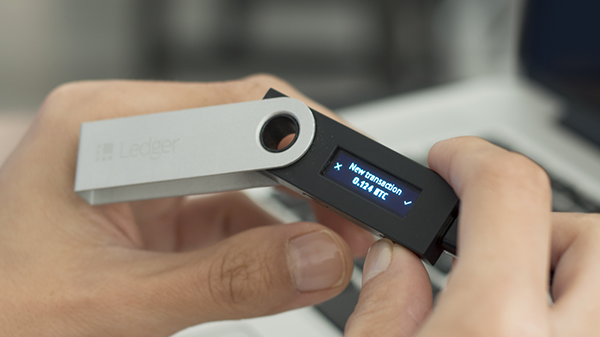

Secure 2FA validation of a transaction directly on the device

If you are not familiar with the notion of hardware wallets, you may wonder what the advantages are versus a paper wallet or an encrypted private key on a computer.
The main principle behind hardware wallets is to provide full isolation between the cryptographic secrets (private keys) and your easy to hack computer or smartphone. Vulnerabilities of modern PCs and smartphones are well known, and if you keep your private keys there (private key = your bitcoins) it’s just a matter of time before you’ll get hacked and lose everything.
A paper wallet may be secure, but only until you want to use your funds, requiring importing your private keys on your computer. And if you think a password encrypting your keys is enough, a malware is smart enough to wait for the inevitable decryption before sweeping your funds.
Hardware wallets are convenient, affordable, portable and backed up by a paper wallet allowing easy recovery in case of loss. If you have any significant amount of bitcoins, using a hardware wallet should be a no brainer.
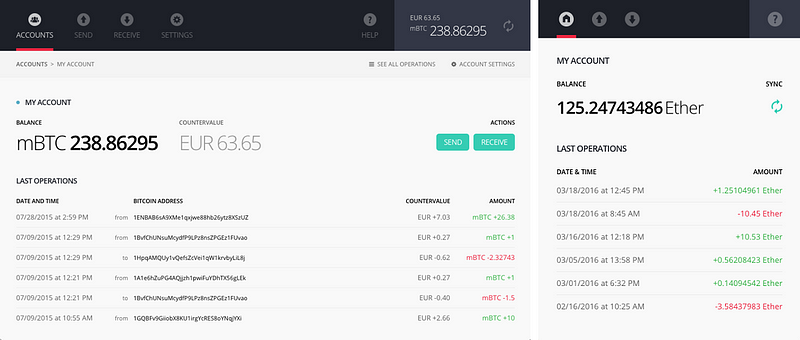
Ledger Wallet Chrome applications for Bitcoin and Ethereum

Ledger Wallet Chrome applications

Nano S comes with a set of Chrome applications to manage your cryptocurrency wallets. The Bitcoin Chrome app is an award winning wallet featuring multi-accounts and rich settings.
In order to manage ethers (the cryptocurrency from the Ethereum network), we have launched a dedicated Chrome app, functioning on the same principles as the Bitcoin one. You can have different accounts and securely receive or send ETH/ETC from your Nano S.
The Ledger Manager is a tool to update your firmware and install new applications on your Nano S.

FIDO U2F authenticator


Nano S is running a certified U2F app and can be used as a second factor security key for Google, Github, Dropbox and other compatible services.
This 2FA mechanism replaces SMS or OTP codes such as Google Authenticators or Authy, and is not only much more secure but also really practical to use.

Open Source

All apps running on Nano S are Open Source. You can audit, review or contribute to the code. Here is the full list of available Nano S and Chrome apps:
Nano S embedded apps
Chrome applications


Nano S for developers

If you are a developer, you can build your own apps for Nano S. Our Ledger Blue SDK is fully compatible with Nano S (UI mechanisms aside) and you can leverage our development tools to start experimenting.

How to Add a Google Sitemap to your Blogger Blog

Generate a Complete Sitemap for your Blogger Blog

Image result for How to Add a Google Sitemap to your Blogger Blog
The XML Sitemap file is like a directory of all web pages that exist on your website or blog. Search engines like Google and Bing can use these sitemap files to discover pages on your site that the search bots may have otherwise missed during regular crawling.


This tutor is valid for both regular Blogger blogs (that use a .blogspot.com address) and also the self-hosted Blogger blogs that use a custom domain (like postsecret.com).
Open the Sitemap Generator and type the full address of your blogspot blog (or your self-hosted Blogger blog).
  1. Click the Create Sitemap button and this tool will instantly generate the necessary text for your sitemap. Copy the entire generated text to your clipboard (see screenshot below).
  2. Image result for How to Add a Google Sitemap to your Blogger Blog
  3. Next go to your Blogger dashboard and under Settings – > Search Preferences, the enable Custom robots.txt option (available in the Crawling and Indexing section). Paste the clipboard text here and save your changes.
And we are done. Search engines will automatically discover your XML sitemap file

Hyundai Ioniq 2017 to have lifetime battery-failure warranty

2017 Hyundai Ioniq to have lifetime battery-failure warranty


2017 Hyundai Ioniq Electric

Hyundai is extending the lifetime battery warranty offered on previous electrified models to the 2017 Ioniq lineup as well.
The warranty applies to all versions of Hyundai's first dedicated green car, including the Ioniq Hybrid, Ioniq Electric, and Ioniq Plug-In Hybrid.
As with previous Hyundai models, the warranty applies to complete failure of the lithium-ion battery packs in these vehicles, not to any degradation in battery capacity that may occur over time.

If the battery pack fails, Hyundai will replace it free of charge and "cover recycling costs for the old battery free of charge to the original owner," according to a promotional e-mail sent to customers.
The warranty does not cover vehicles placed in commercial service, which the e-mail defines as "taxi, route delivery, rental, etc."
Hyundai has offered its lifetime battery warranty since 2012, when it was introduced for the first-generation Sonata Hybrid midsize sedan.

2017 Hyundai Ioniq
2017 Hyundai Ioniq

Like any other component of a car, it is possible that battery packs can fail unexpectedly before the anticipated end of their service lives.
But batteries also degrade and lose some usable capacity over time, presenting a less straightforward issue for automakers seeking to reassure customers with warranty coverage.
While the Hyundai lifetime warranty does not cover battery-capacity degradation, a few automakers do offer coverage for this.

In 2012, Nissan expanded the warranty for its Leaf to cover certain amounts of capacity loss over the first five years or 60,000 miles of a car's life.
This was instituted after complaints and a lawsuit from Arizona owners alleging that Leaf electric cars lost battery capacity much faster than Nissan had indicated in the state's hot climate.
Nissan updated the Leaf battery pack in 2015 with a new and more heat-tolerant chemistry.

2017 Hyundai Ioniq
2017 Hyundai Ioniq

A settlement with Arizona owners announced in 2015 included replacement of batterypacks in 2011 and 2012 Leaf electric cars with these newer versions.
General Motors includes an eight-year, 100,000-mile warranty for the 2017 Chevrolet Bolt EV battery pack.

In the car's owner's manual, GM notes that the battery may degrade anywhere from 10 to 40 percent during that period.
However, the automaker believes a 40-percent reduction in capacity in regular use is highly unlikely (and most owners and analysts agree).

Monday, 13 February 2017

HOW TO SEARCH FOR AND FIND CODE IN BLOGGERS HTML EDITOR

HOW TO SEARCH FOR AND FIND CODE IN BLOGGERS HTML EDITOR


 The code is present in all of Bloggers default templates, it may look a little different depending on what template you are using and what changes you have made but it is there. Blogger updated it’s editor to include some new features and unless you are used to it, it can be confusing. 
Image result for HOW TO SEARCH FOR AND FIND CODE IN BLOGGERS HTML EDITOR
This post will hopefully help to clear up some queries and confusion. 
1. Template 
2. Edit HTML 
2. Click within the HTML box on the first line Press CTRL F on a PC or CMD F on an Apple. A search window will appear in the HTML editor in the right upper hand corner. Use this to find pieces of code. 
Typically I give you a the whole line such as or
instead of trying to search for it all, take the main keyword such as b:skin and find the one mentioned. Once you have typed the code into the search bar, hit enter to find the code. Hitting enter multiple times will find each time the code is used.

 A browsers own search function may not work in the HTML editor, so it is necessary to click into the editor first. It searches from top to bottom so make sure you click on the first line of code.
 Use the numbering on the left to make sure you’ve gotten the right code.

Friday, 27 January 2017

Building a Computer? Here's What You Need.

Customizing a Computer? Here's What You Need

Image result for build a computer

There are plenty of reasons to build a custom computer. While custom computers may initially be more expensive than prepackaged desktops or laptops, they can provide you with nearly endless possibilities, whether you're looking for a top-notch gaming machine, a system for mixing music, or the ideal choice for developing Web applications.
A custom computer is the way to go if you want both performance and flexibility. Upgrading individual parts often is less expensive than buying a new computer, which could save you money in the long run.
Following are the essential parts you'll need.

Processor and Motherboard

The component to start with is the processor, which will dictate your selection of other necessary parts, like the motherboard. UserBenchmark's exhaustive list of user-rated processors is a good resource to help you decide. AMD and Intel are the top manufacturers, but I prefer Intel.
Intel is the industry standard when it comes to processors, so you can't go wrong if that's your choice. Its Core series comes in three families: i3, i5 and i7. The i3 series is good for average computing needs, while the i5 offers a little more horsepower. The i7 series offers you the best performance. For the price, a Core i7-6700k really can't be beat.
After you choose your processor, select a motherboard to go with it. Make sure it is USB 3.1/3.0-capable for optimal speed. One factor to consider is whether you plan on overclocking, which involves running your PC at a speed higher than manufacturer recommendations.
computer motherboard
While you can benefit from short-term performance boosts, overclocking may lead to a shorter lifespan for your computer, so you'll need to consider a compatible motherboard if you plan to do it.

Storage and Memory

Next, choose the storage you want to use. HDD drives are the traditional hard drives that most computers have, and they are extremely affordable.
computer hard disc
However, SSDs are the choice for sheer performance, and their prices are dropping.
I prefer a hybrid option that includes both. A computer built with its system files on a smaller SSD will boot faster, while a larger and cheaper HDD in the 2-TB range gives plenty of storage.

Decide how much RAM you need. If you plan on running a 32-bit OS, then you only need 3 GB of memory since the OS won't support any more. Most likely, though, you will be using a 64-bit architecture where 4 GB is the minimum.
RAM is a relatively cheap upgrade for the performance you get in return. Choose 8, 12, or 16 GB for a better user experience.
You can also put in a DVD/CD drive, though it is not necessary, thanks to portable storage and cloud-based software.

Video and Audio Cards

If you intend to play video games, create digital graphics or edit video, you should invest in something more advanced than a basic video card.
For enhanced graphics, AMD, ATI or Nvidia cards will do the trick. The AMD Radeon RX 460 is a reasonably affordable option that can also handle the needs of most casual gamers.
The same goes for your audio card: If you are editing audio files, you should always opt for a higher-quality card that's compatible with the peripheral equipment you want to connect.

Case, Power and Cooling

You have to buy a case to hold all of that amazing hardware! There are many types of cases on the market with different features. Many cases have a rudimentary power supply and cooling fans. However, if you are building a high-performance system, they are probably inadequate.
All that performance generates heat. Too much heat will cause your computer to crash and may even damage hardware, so be sure to invest in some qualitycomputer cooling fans.
At a minimum, you will want one attached to your CPU heatsink, one larger fan to exhaust heat from the case -- and if not built in, one to disperse heat from your graphics card.
The more powerful your components, the more power you'll need to run your system properly. You don't want to burn through a cheap power supply and have everything shut down on you.
Plan on at least a 500w power supply, but if you've opted for a bigger processor, graphics card, and the requisite fans, you'll need something with more juice. Your components may come with recommended power allowances. If not, I suggest at least a 750w power supply.
Final Thought: Don't be afraid to invest more money up front, as your custom machine can provide years of use before you'll need to upgrade it again. Good luck with your project -- and most of all, have fun!

Monday, 10 October 2016

IP Rating Explained

IP Rated Enclosures Explained

What is an IP rating?

Image result for ip rating
IP (or "Ingress Protection") ratings are defined in international standard EN 60529 (British BS EN 60529:1992, European IEC 60509:1989). They are used to define levels of sealing effectiveness of electrical enclosures against intrusion from foreign bodies (tools, dirt etc) and moisture.

What do the numbers in an IP Rating mean?

The numbers that follow IP each have a specific meaning. The first indicates the degree of protection (of people) from moving parts, as well as the protection of enclosed equipment from foreign bodies. The second defines the protection level that the enclosure enjoys from various forms of moisture (drips, sprays, submersion etc). The tables below should help make sense of it:

IP Ratings - what they mean.

IP Rated Enclosures - quick find chart

A number replaced by x indicates that the enclosure is not rated for that spec.

First Digit (intrusion protection)

  1. No special protection<
  2. Protection from a large part of the body such as a hand (but no protection from deliberate access); from solid objects greater than 50mm in diameter.
  3. Protection against fingers or other object not greater than 80mm in length and 12mm in diameter.
  4. Protection from entry by tools, wires etc, with a diameter of 2.5 mm or more.
  5. Protection against solid bodies larger than 1mm (eg fine tools/small etc).
  6. Protected against dust that may harm equipment.
  7. Totally dust tight.

Second Digit (moisture protection)

  1. No protection.
  2. Protection against condensation
  3. Protection against water droplets deflected up to 15° from vertical
  4. Protected against spray up to 60° from vertical.
  5. Protected against water spray from all directions.
  6. Protection against low pressure water jets (all directions)
  7. Protection against string water jets and waves.
  8. Protected against temporary immersion.
  9. Protected against prolonged effects of immersion under pressure.
  • IP65 Enclosure - IP rated as "dust tight" and protected against water projected from a nozzle.
  • IP66 Enclosure - IP rated as "dust tight" and protected against heavy seas or powerful jets of water.
  • IP 67 Enclosures - IP rated as "dust tight" and protected against immersion.
  • IP 68 Enclosures - IP rated as "dust tight" and protected against complete, continuous submersion in water.


Before you leave, do me a favor and answer me this question:
What’s your opinion of Bitcoin
~Is it here to stay — permanently — or is it just another passing fad?

Leave your comment below  (Please! Don’t forget to use the social sharing buttons, either)!

Sunday, 9 October 2016

Leica’s X-U Review

Leica’s first underwater rugged camera

Leica_waterproof (2)
 X-U  camera this amazing shooter has amazed us aplenty with a promise of being rustproof, shockproof when dropped from four feet and of course, the 49-feet waterproof ability. 
The camera has a 3-inch 920k-dot LCD display that you can review and preview your shots on. You will enjoy shots captured at 5 fps thanks to a maximum ISO of 12,500 and 1080p HD footage at 30 fps.
Leica_waterproof (5)
You will find the manual shutter speed and aperture control dials atop the camera and placed above the lens is an integrated flash. 
The camera sports a 16.2-megapixel APS-C CMOS sensor with the hallmark Summilux 23 mm f/1.7 lens In the front of the camera.
The rubberized exterior does well to absorb shocks and also serves as a fantastic grip.
Leica_waterproof (1)
Not only that is a great to use camera but also a handsome camera to have one.


Before you leave, do me a favor and answer me this question:
What’s your opinion of Bitcoin
~Is it here to stay — permanently — or is it just another passing fad?

Leave your comment below  (Please! Don’t forget to use the social sharing buttons, either)!

Monday, 26 September 2016

iOS 10 REVIEW

iOS 10 review


Image result for ios 10

 iOS 10, the latest operating system for Apple's iPhone and iPad. On June 13, 2016, Apple unveiled iOS 10, the next-generation operating system for the iPhone, iPad, and iPod touch,  on September 13 it was released to the public. At the introduction, Apple CEO Tim Cook described iOS 10 as the "biggest release ever" for iOS users, and the operating system includes major updates for a wide variety of apps, features, and services, including Messages, Maps, Apple Music, News, Apple Pay, Siri, Photos,  Control Center, and more.
Image result for ios 10  Features:
*Siri
Siri now integrates third-party apps Apple is opening up Siri and making the process for app developers transparent is great which is important, some apps can now be controlled by Siri: calls, messaging, payments, photos, ride-sharing apps, workouts, and CarPlay systems. Square Cash,  WhatsApp, and Yelp, LinkedIn, OpenTable, Uber, are all options inside Siri.
In settings you can find a list of your apps that support Siri.
You still can only use Siri with voice and can’t type at it.
*Maps:
Apple Maps has been overhauled in iOS 10. Apple has put a slider on top of the map canvas, on the bottom, and generally cleaned up the way it displays pins and locations on the map itself.
The CarPlay navigation view is a little more robust now, too. It can connect to restaurant apps and ride-sharing apps and the navigation view is also better and allows you to search along the route.
*iMessage:
iMessage is becoming a platform all its own. There are third-party apps, stickers, crazy confetti effects, and emoji.  You can embiggen your texts so they slam on the screen when you send them. You can turn your phone sideways and scribble out notes — then send them with the "invisible ink" option so your recipient has to manually reveal them. You can search for GIFs . You can draw on photos before you send them.
The basics are easy, and if you want to go bonkers you can hunt the rest down. our chats could become a multimedia nightmare of stickers, drawings, audio clips, GIFs, heart beats, kisses, and laser effects. Or maybe that's a wonderland, not a nightmare. Your call.
There are also more full-featured apps in iMessage.
*Lock screen and notifications:
 Apple Slide to Unlock feature that was one of the defining features of iPhones since they were first announced is out of the way now. Instead, you'll use Touch ID and press the home button to unlock. It's different, and it takes a little getting used to.
The screen wakes up as soon as you lift your phone up, showing your notifications straight away. To unlock, you press the home button.
The bigger change to the lock screen is how it handles notifications: they've been overhauled all over the OS, and the lock screen gets those benefits. They look different now they're discrete bubbles.
*Widgets:
Today View shows up in three places: the left of the home screen, notification pane, and lock screen. It's a place for you to put all your widgets for weather and news and whatever else, replacing Apple's own half-baked attempts with the old Siri predictive screen. Apple’s own apps have a bunch of widgets ready for use and there are third-party widgets already available, too because they were there on iOS 9. But they’re easier to find now.And Control Center also lets you use 3D Touch on the bottom row of icons (which, frustratingly, you cannot change) but not (again, frustratingly) the system toggles on the top. It’s split into two, sometimes three panes. The first is for system controls, the second for audio controls, and the third (if you need it) for smart home controls.
*Music
Image result for ios 10 Music

Apple Music in iOS 10, is the better. The "Connect" tab, a little feed of content from your favorite artists, has been sent off to live with Ping on the island of forgotten Apple social ideas.
The overall navigation and organization of the app has been clarified and cleaned up. Like Spotify, Apple Music is trying to be at least two things at once: a place to navigate your own music library and a place to discover new music via a subscription service.
The new "Now Playing" screen is also simplified, just don't forget to scroll up a bit to get options like lyrics and the shuffle / repeat buttons.
*Other Apps:

Apple News continues to exist, now with breaking news notifications from key partners
Apple Mail. It finally does a decent job threading emails into a single, scrollable pane of messages. you couldn't imagine using a mail client that doesn't offer a "snooze" function anymore, and there are too many good options out there that offer it to consider sticking with Apple Mail.
*CarPlay:
Image result for CarPlay in iOS 10
Just like in iOS 10 for iPhone, iPad and iPod touch devices, Apple CarPlay now has the ability to remove or hide stock apps if the user sees fit. It’s natural to assume that not every stock app that ships pre-installed with CarPlay will be useful to the vehicle owner, just like not every app on the iPhone or iPad is utilized frequently. Seeing this, Apple has given users the ability to remove stock apps in CarPlay as well.
This option can be accessed by heading into Settings > General > CarPlay > [Your Car/Receiver Name] on the connected iPhone.

Before you leave, do me a favor and answer me this question:
What’s your opinion of Bitcoin
~Is it here to stay — permanently — or is it just another passing fad?
Leave your comment below  (Please! Don’t forget to use the social sharing buttons, either)!